

Before you start
- You need a signing link. See How do I create a signing link that anyone can sign?.
Steps
- Click “Links” in the left menu.
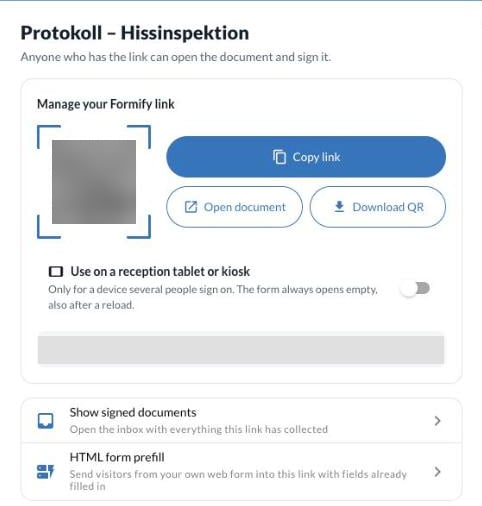
- Click the name of the link. A window opens with the link name and the box “Manage your Formify link”, with a QR code and the link address.
- Choose what you need:
- “Copy link”: copies the address. Paste it as a button or text link on your website, in an email signature or in a message.
- “Download QR”: saves the QR code as an image.
- “Open document”: opens the link in a new tab, the way signers see it.
- Close the window with the X.
Good to know / Troubleshooting
- Anyone with the address can open and sign. That is why an active link says “Public link” in “Links”. Share it where the right people will find it. If the link uses a signature type with an ID check, the signer also needs their ID document.
- A withdrawn link says “Withdrawn”. Clicking it does not open the window. The app says “The document has been withdrawn” and shows the old address.
- Changing the link changes it for everyone. Only the person who created the link can edit it, with “Edit link” on its row in “Links”. The address stays the same. Before you edit, the app warns: “This will affect all recipients who have already received the link.”
- A tablet at your reception? In the window, turn on “Use on a reception tablet or kiosk”. The address and QR code change to a special address for that device. Copy it or download the QR code, and open it on the tablet. The app says: “Only for a device several people sign on. The form always opens empty, also after a reload.” The switch is not saved: it is off again the next time you open the window.
- See what the link has collected. Click “Show signed documents” in the same window.
- Want the signer’s details filled in from your own web form? See How do I prefill a signing link from a form on my website?.