

Before you start
- You need a signing link. See How do I create a signing link that anyone can sign?.
- Only the person who created the link can add, change or remove websites. Colleagues who see a shared link can only read the settings.
- The app says: “No API key is needed.”
- Your web form must send its data as a normal HTML form with method=“POST”.
- The page with the form must use HTTPS. Only localhost, for testing, may use HTTP.
Steps
- Click “Links” in the left menu and click the name of the link.
- In the window, click the row “HTML form prefill” (“Send visitors from your own web form into this link with fields already filled in”).
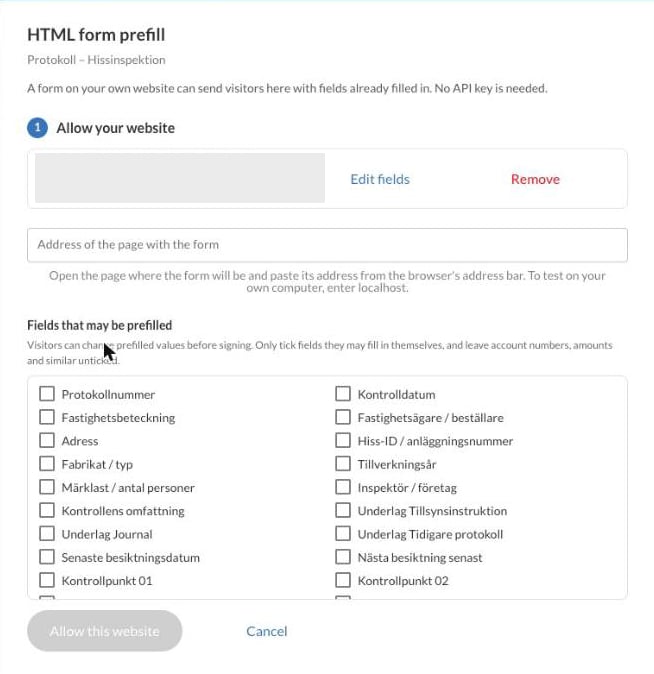
- Under “1 Allow your website”, the boxes for your first website are already open. To add another website later, click “Add website”.
- In “Address of the page with the form”, paste the address of the page where your form will be, copied from the browser’s address bar. To test on your own computer, enter localhost.
- Under “Fields that may be prefilled”, tick the fields this website may fill in. Nothing is ticked from the start.
- Click “Allow this website”. When you add another website, you can click “Cancel” to stop without saving.
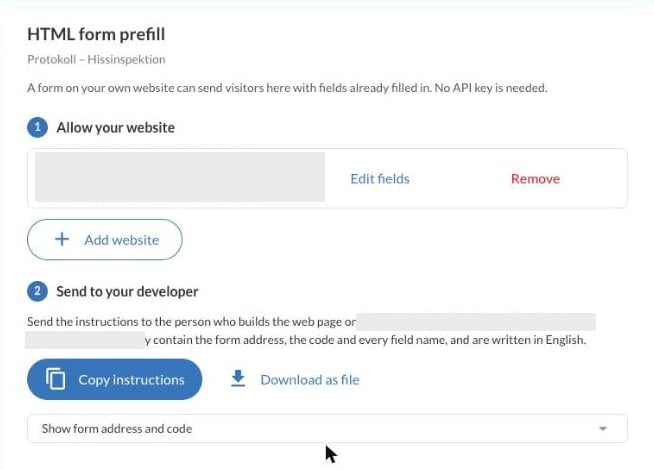
- Under “2 Send to your developer”, click “Copy instructions” (or “Download as file”) and pass them to the person who builds your web page. The instructions contain the form address, the code and every field name, in English. If you build the page yourself, open “Show form address and code” to see the “Form action URL” and an “Example form” with “Copy code”.
- Put the form on your web page. Test it once before you share it.
Good to know / Troubleshooting
- Visitors can change prefilled values before they sign. The app says: “Only tick fields they may fill in themselves, and leave account numbers, amounts and similar unticked.”
- Some fields can never be prefilled, for example signature fields, read-only fields, verification fields, ID scan fields, the automatic date and attachment uploads.
- The address with and without www counts as two different websites. Other subdomains count as different websites too. Add the exact address your visitors use. The page path and the port do not matter.
- Up to 10 websites per link. Each website has its own fields.
- Change or stop a website. Next to each allowed website, “Edit fields” changes the fields and “Remove” stops it.
- The document opens empty. Check that:
- the page address matches an allowed website exactly, including www;
- the page uses HTTPS;
- the form is a normal POST form, not a script or a site-builder plugin form;
- the input names are the ones in the instructions;
- the visitor opened the document within 30 minutes of sending the form.