

Before you start
- The app says: “The settings apply to every user on this account. Only account administrators can change them.” Other users see the tab read-only.
- Check your role in Settings > “Users”. Administrators are marked “Admin”.
- Accounts in the EU, the EEA, Switzerland and the UK see four switches. Other accounts see only “AI features”.
Steps
- Click the briefcase icon at the top right and select “Settings”.
- Open the “Data controls” tab.
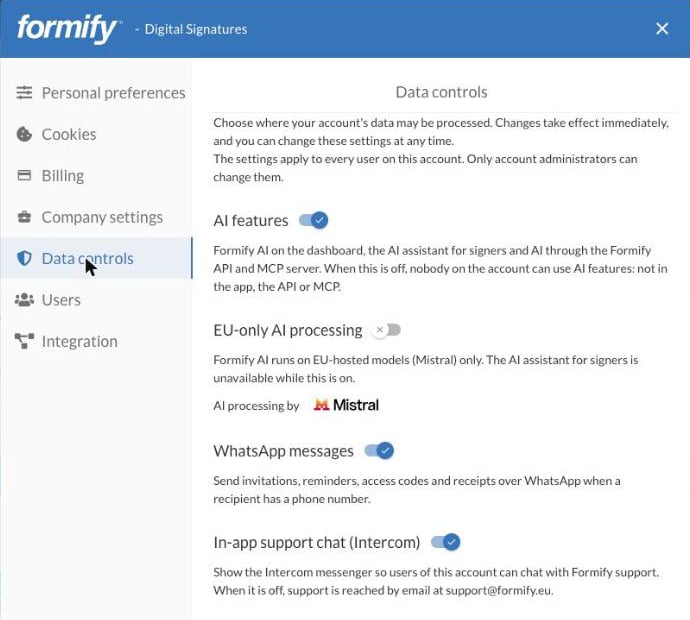
- To turn Formify’s AI off, switch off “AI features”. It covers “Formify AI on the dashboard, the AI assistant for signers and AI through the Formify API and MCP server.”
- To keep AI processing in the EU, switch on “EU-only AI processing”. The app says: “Formify AI runs on EU-hosted models (Mistral) only.” This switch is locked while “AI features” is off.
Good to know / Troubleshooting
- With “AI features” off, Formify AI in the app and the AI assistant for signers are off, also when asked for through the API or MCP. The API and the MCP server keep working for everything else.
- With “EU-only AI processing” on, “The AI assistant for signers is unavailable while this is on.” The app adds: “The AI assistant for signers is switched off, also on documents you have already sent.”
- I cannot change the switches. Only account administrators can. Ask an admin on your account.
- Other settings on the same tab. “WhatsApp messages” lets Formify send invitations, reminders, access codes and receipts over WhatsApp. “In-app support chat (Intercom)” shows or hides the support chat; when it is off, support is reached by email at support@formify.eu.
- What about Claude or ChatGPT? When you use Formify from Claude or ChatGPT, what you type in the chat is processed by that AI provider under your agreement with them. Turning off “AI features” does not disconnect them. To remove their access, see How do I disconnect Claude or ChatGPT from my Formify account?